White-label mobile trading apps: a practical acquisition guide
By Spotware team
Published
10 min read
Share this post
Mobile trading is now a major part of the retail trading market. For a broker looking for new trading clients, or a prop firm looking for challenge participants, that makes the phone the obvious place to find them. It also raises a practical question: once the advertising starts, how do you tell which campaign brought anyone in?
An install total alone does not answer it. In AppsFlyer, an install is recorded when the app is first opened. The total does not show which campaigns received credit or whether users went on to register.
Two obstacles come first. A proprietary trading app needs specialist developers, ongoing maintenance and a budget that keeps running after launch. And publishing the app is not the same as acquiring traders: someone still has to promote it and decide which results count.
cTrader deals with both. Brokers and prop firms can get a white-label mobile trading app for iOS and Android under their own brand, built and maintained by Spotware. The app supports mobile ad attribution through AppsFlyer, so installs can be credited to the campaigns behind them and followed into registration and account-opening interest, within the limits of the attribution method and privacy rules.
What a white-label mobile trading app gives you
A white-label mobile trading app is a ready-made trading app that a company publishes under its own name and visual identity. With cTrader, that means native iOS and Android apps built on cTrader Mobile and listed in the App Store and Google Play as the firm's own.
The term is easy to confuse with a different business model. In white-label platform reselling, a firm operates on another broker's infrastructure and arrangements (we compare that model with running your own platform in white label vs main label brokerage). A branded app is a product, not a business model: the firm keeps its own operations and simply does not build the trading interface itself.
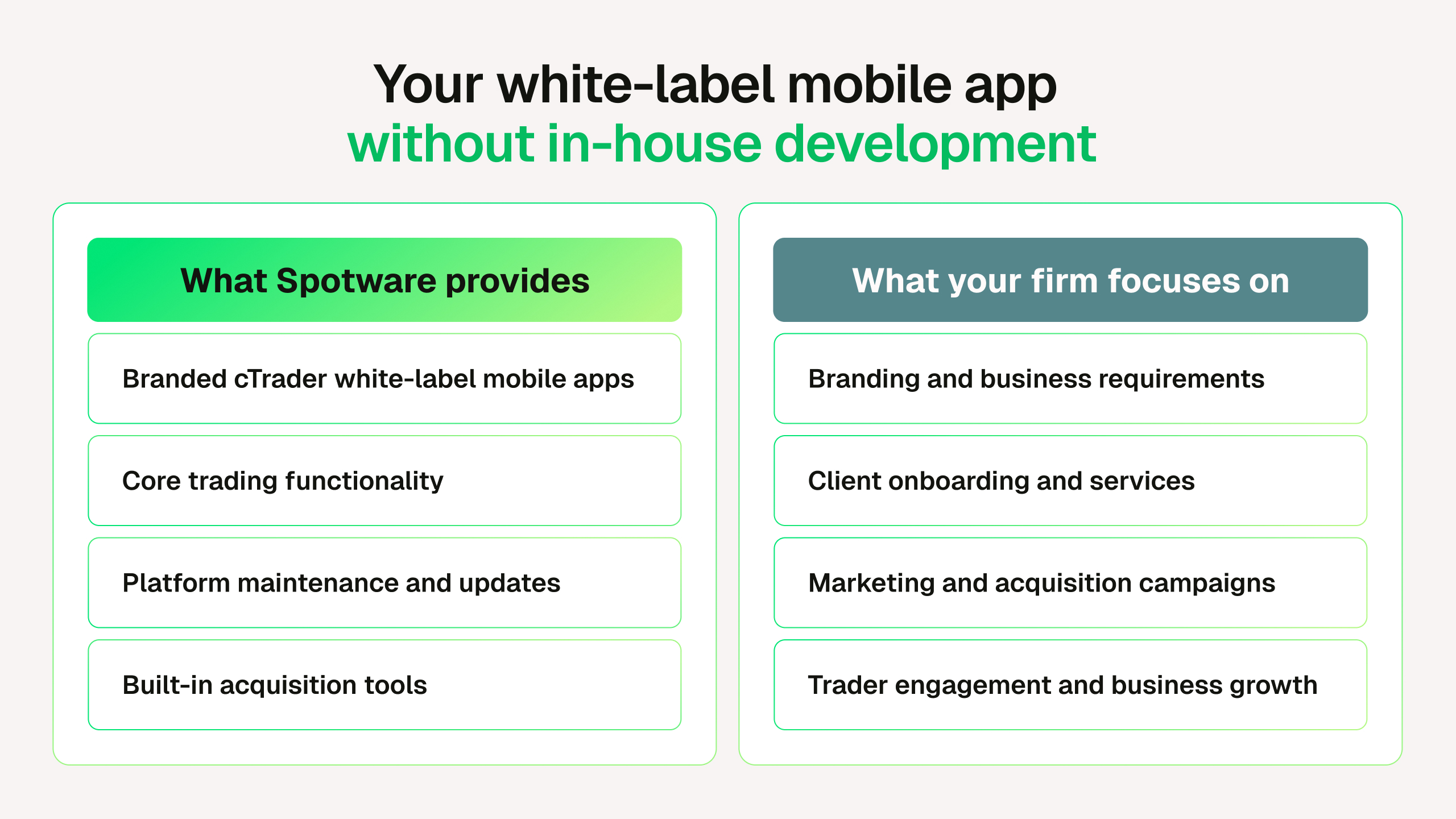
Spotware develops the underlying platform, maintains the apps and releases updates. The firm gets cTrader Mobile's existing native charting, order management, trading protections and account functionality without designing those screens or hiring a team to keep the app running. The cTrader Mobile Help Centre sets out what the app supports in detail.
The firm is still responsible for the following:
supplies branding materials and business requirements
takes part in account configuration and launch approvals
runs its own onboarding, client services and marketing.
For a broker, the result is a professional mobile experience under its own name without a separate development project. Prospective clients download the broker's app instead of being sent to a generic platform download. For a prop firm, challenge participants trade in an app that carries the firm's brand, while its team stays focused on its evaluation programmes and its traders.
Turning the app into an acquisition channel
A branded app can serve prospective traders as well as existing clients. Once it carries the firm's name and supports attribution, it can also be where advertising leads: the place someone lands after tapping an ad.
The mechanics will be familiar to any performance marketing team. A firm runs app campaigns through mobile advertising networks such as Google Ads and Meta Ads, and each campaign can target a particular market, audience or offer. The ad leads to the app's page in the App Store or Google Play, or to the firm's website, and the install that follows can be credited to the campaign.
One condition sits outside the technology. Ads for CFDs and rolling spot forex are restricted. Google, for example, allows them only in eligible countries and only from advertisers it has certified, who must meet the licensing requirements of each country they target. Local rules on risk warnings still apply (Google Ads policy on complex speculative financial products). Every campaign has to fit the network's policies and the financial-promotion rules of the markets it targets.
What attribution adds is the link between the campaign and what happened next. Attribution connects campaign credit with the events users trigger in the app, so the team can compare sources, campaigns and creatives by attributed installs and by the registrations and account-opening taps that followed.
Take a broker running two app campaigns in the same country, one built around its trading conditions and one around copy trading. A prospective trader taps the copy-trading ad, installs the broker's branded app and creates a cTrader ID.
Across all the users each campaign brings in, the broker can compare attributed installs, registrations and New Live Account events, which record taps on the button for opening a live account. That shows which message is associated with interest in a live account, not just with downloads. Whether those accounts were actually opened is confirmed in the broker's own systems.
A prop firm's question is different. Say it runs a Google campaign aimed at traders interested in its evaluation programme, and its challenges are sold on its website. In attribution reports it can compare the installs credited to that campaign, how many of those users registered and how often they came back. Whether they went on to buy a challenge is a question for its checkout data, connected to the app activity where it has set up that tracking.
For both, mobile advertising can reach traders beyond the firm's existing website visitors and audiences, and the marketing team gets a way to compare campaigns on more than downloads. Advertising does not automatically produce qualified traders or profitable acquisition. Attributed activity shows which campaigns are worth testing further. Whether they paid off takes the firm's own conversion data, set against what each campaign cost.
How an ad click becomes an attributed install
Six steps sit between the ad and the report. Most of them happen without the user noticing.
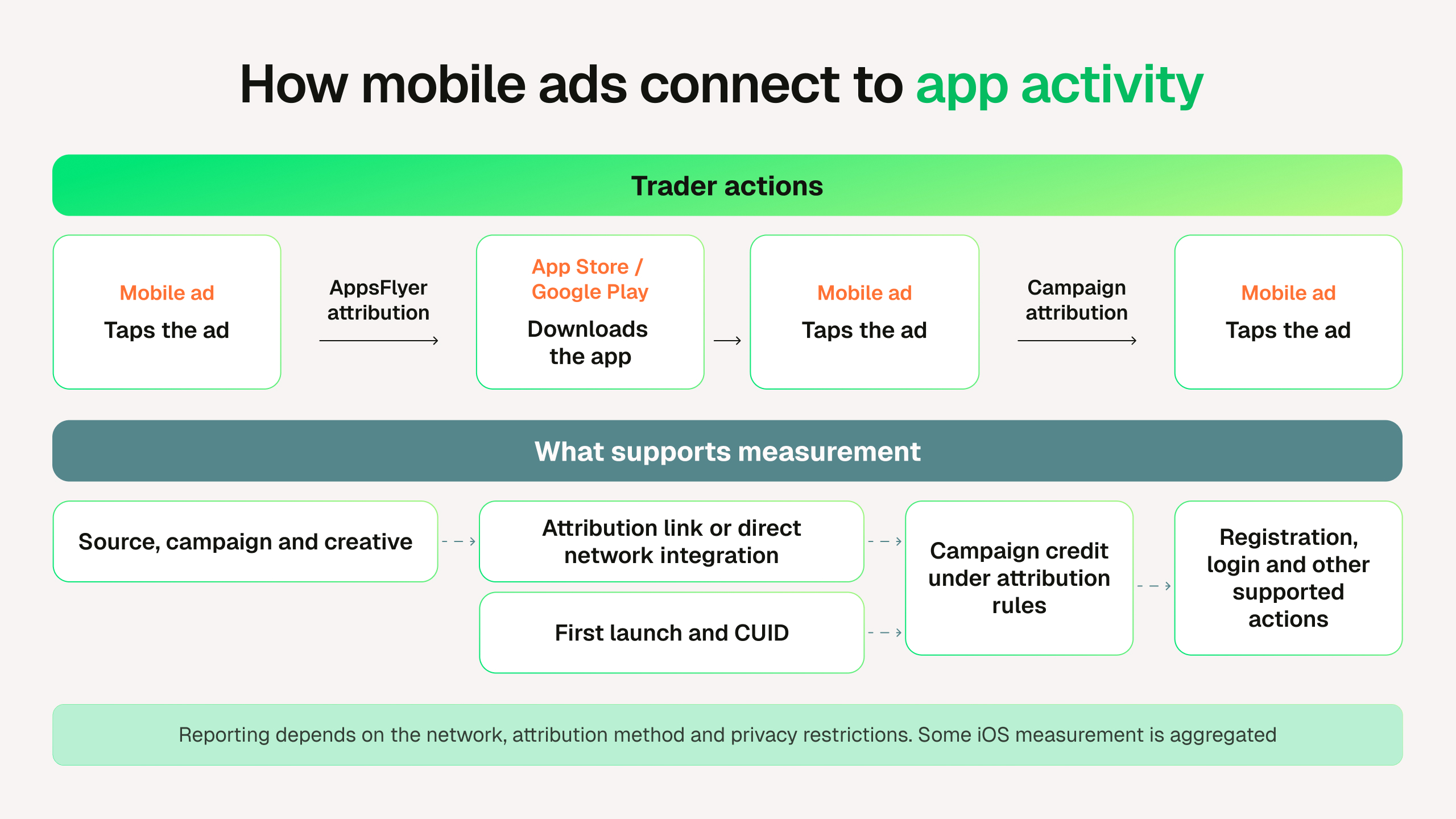
The company launches a campaign. The marketing team creates it in an ad network such as Google Ads or Meta Ads. Many networks use AppsFlyer attribution links, which carry the media source, campaign and creative. Google Ads and Meta work differently: they connect through direct integrations, and the campaign detail they report varies by network.
A prospective trader taps the ad. Where an attribution link is used, it records the available details, such as the media source and campaign. Google Ads and Meta supply their attribution information later, when queried after the install.
The user reaches the app. Depending on the campaign settings, they land in the App Store, Google Play or on the company's website.
The user installs and opens the app. The branded cTrader app contains the AppsFlyer software development kit (SDK). Once the firm's configuration has been added, the SDK sends a first-launch event when the app opens for the first time. The setup also uses a Customer User ID (CUID) to associate later app activity with a user identifier.
The install is attributed. The attribution platform matches the first launch to the advertising interaction that came before it and credits the campaign, within its attribution rules and privacy restrictions.
The company analyses the results. Marketing compares sources and campaigns by installs and by what users did in the app afterwards.
Two limits are worth knowing before reading any report:
On iOS, Apple's privacy framework means some campaigns are measured in aggregate rather than user by user.
Attribution assigns credit under defined rules. It does not show whether the user would have installed without the ad.
What brokers and prop firms can actually measure
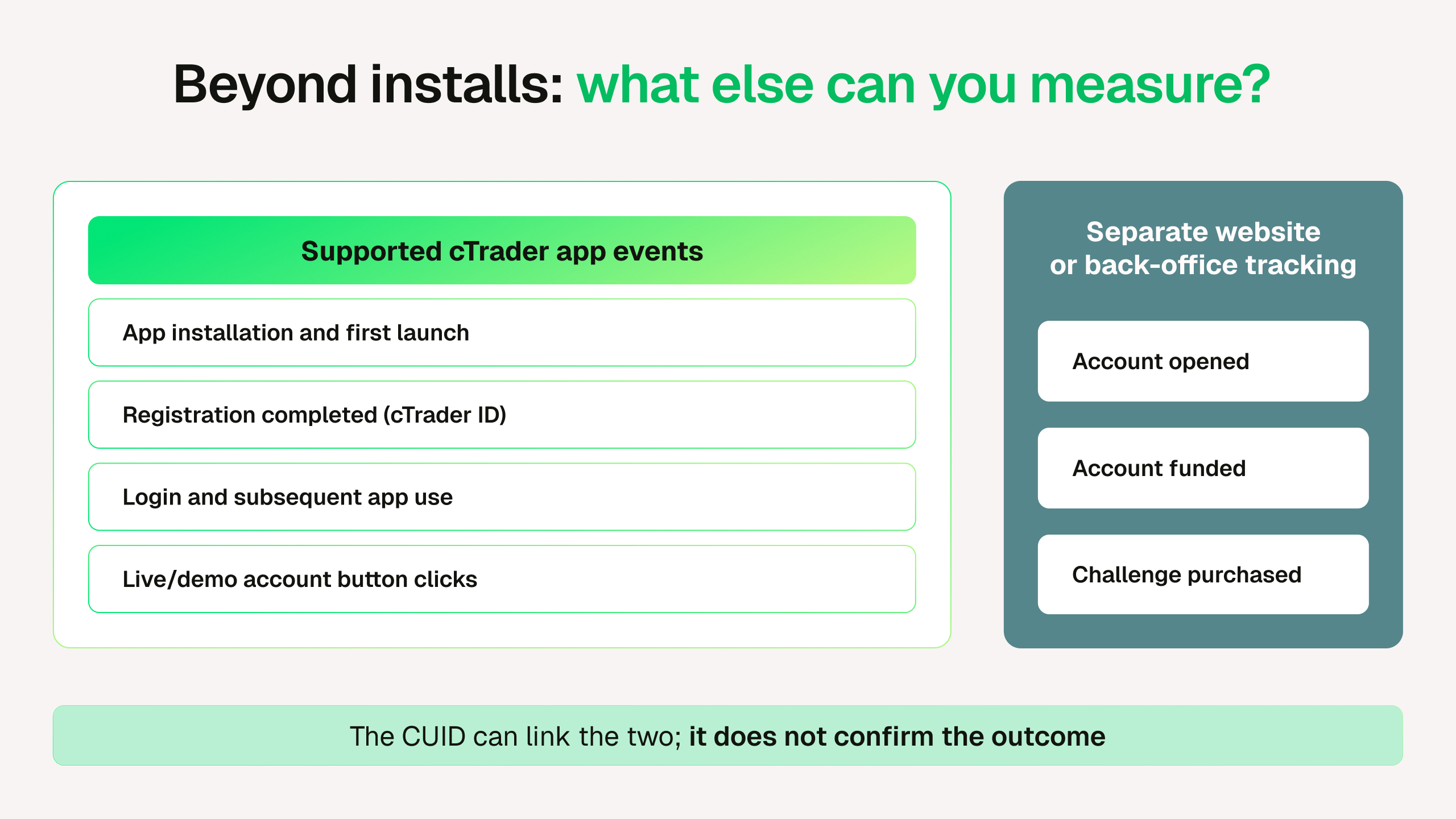
Beyond the install, the branded cTrader app sends a short list of standard events. The table sets out what each one records and what it does not prove.
Event
What it records
What is does not prove
Install (first launch)
The app's first launch after installation
A new customer or an install caused by the ad
App launch
Each later launch of the app
Trading or other account activity
Registration completed
A new cTrader ID, with the method used: email, Google or Apple ID
Completed onboarding with the broker or a challenge enrolment
Login
A successful login from the login page
Trading activity
New Live Account / New Demo Account tap
A tap on an account-opening button
That an account was opened, verified or funded
The last row needs the most care. The New Live Account and New Demo Account events record a tap on a button for opening a live or demo account. That shows someone wanted an account. It does not show that they finished the application, passed checks or funded anything.
That next step happens on the firm's side. Where account-creation links are configured in cTrader Admin, cTrader can add the CUID to the link that takes the user to the firm's registration page. The website then has a reference it can connect back to the app activity. The reference itself confirms nothing. Connecting completed onboarding, passed checks or a funded account back to the app activity takes matching website or back-office tracking.
In practice, each business model reads the same events differently:
A broker can compare campaigns by the share of their attributed installs that go on to register and trigger the New Live Account event, measured over the same number of days after install. Raw totals tend to favour whichever campaign had the larger budget. A broker that leads with a demo account can read the New Demo Account event the same way, then confirm completed accounts in its own systems.
A prop firm can compare campaigns by registrations and repeat app use, and connect challenge purchases through its checkout data where it tracks them.
The standard app events do not report challenge purchases, evaluation progress or payouts.
Where to start
Most of the setup is organisational rather than technical, and it is split between the firm and Spotware.
Get a branded cTrader mobile app. The firm prepares it with Spotware. Trading technology already exists.
Open an AppsFlyer account. It is a separate service with its own commercial terms, so the firm holds the account and the contract. Spotware's AppsFlyer integration page covers the basics.
Create the app in AppsFlyer. The firm sets up an app project in its dashboard that matches the branded app.
Share the configuration with Spotware. The firm passes the project's Dev Key securely to the cTrader Customer Success team, and Spotware adds it to the branded app so the SDK can start.
Prepare the first campaign. Marketing chooses the audience, ad network, markets and objective and sets up attribution for each network.
Review the data. After launch, compare sources, installs and in-app events, and judge campaigns by registrations and account-opening taps rather than downloads.
Our advice before scaling spend: test the route a new user would take, using the procedure each ad network requires. Google Ads and Meta, with their direct integrations, are tested differently from link-based networks. Then register, tap the account button and check that each event appears in the dashboard. If the route continues to your website, check that the CUID arrives there and that your own conversion tracking picks it up.
What to decide before the first campaign
A broker or prop firm can now put a branded trading app in the App Store and Google Play without running its own mobile development. The more important decision is what that app should do for acquisition. Before the first campaign, pick the result you will judge it by. A broker might compare cTrader ID registrations and live-account taps. A prop firm might look at registrations and repeat app use. cTrader supplies the app and the attribution support. The advertising strategy, any separate conversion tracking and the commercial decisions stay with the firm.