The cTrader Desktop 4.2 update betters the desktop version of cTrader with one of the biggest selections of technical improvements within several years, to benefit one of the most vital members of the cTrader ecosystem - the developer.
Among other improvements, cTrader Desktop has now migrated to the latest. NET6 version, providing many new features for developer use, while maintaining the old NET4 framework for backward compatibility with all existing cBots and indicators.
Additionally, cTrader has altered the way an algo file is built by removing any dependency from the cTrader application for the build process. The whole building process now takes place using .NET build tools, which gives users the option to use any IDE to work on their algos, from Visual Studio to Jetbrains Rider, to easily reference other libraries from NuGet, to integrate their algo with .NET products such as ASP.NET, WPF, WinForms, and ML.NET, and to compile cBots and indicators using the 'dotnet build' command and even write code and compile it on Linux or Mac.
Furthermore, there has been added improved intellisense with C# 10 support, a new installer and updater for cTrader, improvements for backtesting and optimization, debugging support, new compiler settings, improved automate logs, live progress for optimization pass, and much more, to make the developer experience as smooth as can be.
Download cTrader Desktop 4.2 Beta
Latest .NET Runtime
cTrader Desktop was migrated to the latest .NET 6 version, which brings a lot of improvements and gives many new features for developer use. From now on .NET runtime will be distributed with the cTrader application, using our new installer and updater. Algo developers will no longer need to worry about the .NET runtime version on client machines.

Algos can be executed with old and new .NET
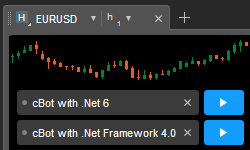
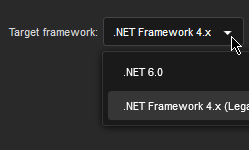
Now algos can be executed with both - the old .NET Framework 4.x and the new .NET 6. Please note that these changes will not affect existing cBots and indicators. Old cBots and indicators will be launched in a child process running .NET Framework, while new cBots and indicators that target .NET 6 will be running in different processes using .NET 6. This way, cTrader keeps great backward compatibility for all existing cBots and indicators and brings the latest .NET technology to your new projects.
Algo execution moved out of process
cBots and custom indicators are now executed in different processes. This allows great backward compatibility for old cBots and indicators, better isolation of the main cTrader process, and better security from potentially malicious code. Now you will see multiple processes in the Task Manager running under the main cTrader process.
Easy upgrade from .NET Framework to .NET 6
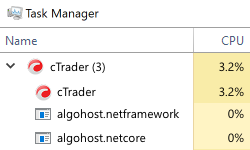
Developers can now easily update cBots and indicators to .NET 6 by switching Target in the Code Editors toolbar and build algo with the new target. If your algo contains dependencies on other libraries, we suggest making a copy and checking migration on the copy first.
All IDEs and any references
We changed the way an algo file is built by removing any dependency from the cTrader application for the build process. The whole building process now takes place using .NET build tools.
This means that you can now:
- Use any IDE to work on your algos: Visual Studio, Visual Studio Code, Jetbrains Rider
- Easily reference other libraries from NuGet, which contains 250,000+ libraries
- Integrate your algo with .NET products such as ASP.NET, WPF, WinForms, and ML.NET
- Compile cBots and indicators using the 'dotnet build' command and even write code and compile it on Linux or Mac

Improved Intellisense and C# 10 support
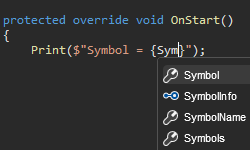
Built-in Code Editor now has a new improved Intellisense with C# 10 support. You can find out more about the latest changes in C# language here
New installer and updater for cTrader
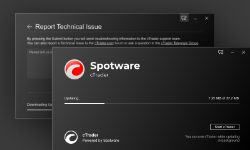
The cTrader application now has a new installer and updater. It works better than the previous installation technology and provides a better user experience, including the ability to launch the old cTrader version while an update is in progress.
OnDestroy method for indicators
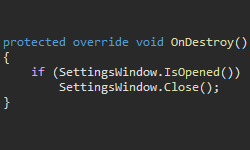
Indicators now have an OnDestroy method that allows one to free allocated unmanaged resources and run other finalization tasks.
Improvements for backtesting and optimization
Backtesting and optimization have been improved with multiple changes to remove any differences between them. Optimization adds multi-symbol support for trading, price updates and market data requests.
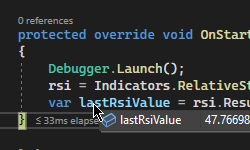
Debugging support
Both .NET 4.x and .NET 6 algos can be debugged in Visual Studio with real-time, silent or visual backtesting, or optimization.
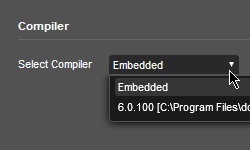
New compiler settings
A compiler setting that allows selecting between embedded compiler and .NET SDK has been introduced. The embedded compiler has limited functionality, but is enough for simple projects without any references. If you want to use the full power of .NET for complex projects, select .NET SDK or compile from Visual Studio, other IDEs, or using the 'dotnet build' command.
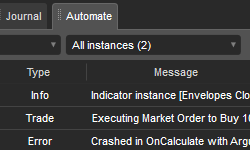
Improved Automate logs
cBot logs tab has been renamed to Automate and now shows combined logs for cBots and indicators.
Suspended indicators due to error
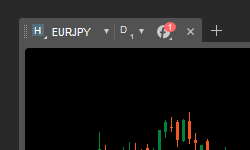
A custom indicator that has an error will be suspended and will show on the chart as stopped. When an error occurs you will see a red icon on the top of the chart. From the indicators list, you can restart such an indicator or remove it altogether.
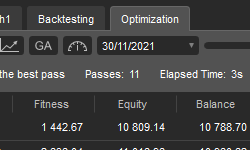
Live progress for optimization pass
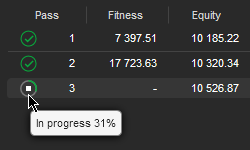
In previous versions, the optimization table showed only passes that were finished. You were not able to see passes that are in the progress. Now, such passes are displayed with real-time updates. Individual passes can also be stopped. This allows for reduction of waiting time when you see that a long-running pass is not performing well.
Icon for an old algo file for a cBot
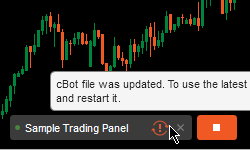
When an .algo file is updated on the disk for a cBot, e.g. when you rebuild it, you will see an icon showing that you are running an older version. To run the latest version you will need to stop and restart it.
Auto-format code hotkey
New hotkey Ctrl + D has been added to the autoformat code.